Free tools for video, audio and captions.
74 tools that each do one job on a video, audio, caption or image file: trim, convert, compress, caption, record, transcribe. No account, no watermark.
The everyday jobs.
-
Video trimmer
Cut a video down to the part you want. Drag the start and end on a preview, then download the section. -
Audio and video transcriber
Turn up to 5 minutes of speech into text and captions, in 17 languages, ready to copy or download. -
Add subtitles to video
Burn an SRT or WebVTT caption file into a video so the captions show on every platform. -
Video compressor
Make a video file smaller: pick a quality level or name the size in megabytes it has to fit under. -
Video resizer
Fit a video into a vertical, square or landscape frame without stretching it, with bars or a blurred background. -
Video to MP4 converter
Convert MOV, MKV, AVI, WebM, WMV and other video files into an MP4 that plays everywhere. -
Audio loudness normalizer
Bring a recording to a standard loudness, such as -16 LUFS for podcasts, and see the measured before and after. -
Online teleprompter
Paste a script and read it full screen at your speed, with mirror mode and keyboard control.
Doing these one at a time?
Send the whole recording to Studio instead. It cuts the retakes and long pauses, adds captions and makes short clips.
Every tool, by job.
AI drafts and caption translation are paused for now. Every other tool works.
Video 33
Trim, convert, resize and fix video files.
Video trimmer
Cut a video down to the part you want. Drag the start and end on a preview, then download the section.
Video splitter
Split one video into several clips: by length, into equal parts, or at the exact times you type.
Video resizer
Fit a video into a vertical, square or landscape frame without stretching it, with bars or a blurred background.
Video cropper
Crop a video to 9:16, 1:1, 4:5, 16:9 or 4:3 and choose which part of the picture stays in frame.
Video compressor
Make a video file smaller: pick a quality level or name the size in megabytes it has to fit under.
Video to MP4 converter
Convert MOV, MKV, AVI, WebM, WMV and other video files into an MP4 that plays everywhere.
Video to WebM converter
Convert a video to WebM (VP9 and Opus) for web pages and browsers.
Video to GIF converter
Turn up to 30 seconds of a video into a looping GIF at the size and frame rate you choose.
Video rotator
Turn a sideways or upside-down video by 90 or 180 degrees and save it the right way up.
Video flipper
Mirror a video left to right, or flip it top to bottom.
Mute video
Remove the sound from a video. The picture is copied untouched, so there is no quality loss.
Video to MP3 converter
Pull the sound out of a video as an MP3 at 128, 192, 256 or 320 kbps.
Video to WAV converter
Extract a video's sound as an uncompressed 16-bit WAV file for editing.
Video speed changer
Speed a video up or slow it down, from 0.25x to 4x, without making voices squeaky or deep.
Video looper
Repeat a short clip from 2 to 20 times in one MP4.
Video joiner
Join several clips into one video, in the order you set, even when their sizes differ.
Add audio to video
Replace a video's sound with your own audio file, or mix music under the original sound.
Add a logo to video
Put your logo or watermark in a corner of a video, at the size and opacity you choose.
Add text to video
Put a title or caption on a video: choose the position, size, color and when it shows.
Add subtitles to video
Burn an SRT or WebVTT caption file into a video so the captions show on every platform.
Video thumbnail extractor
Scrub to any frame of a video and save it as a full-resolution PNG or JPEG.
Video contact sheet
See a whole video at a glance: evenly spaced frames with timestamps on one image.
Video brightness editor
Fix a dark, flat or washed-out video with brightness, contrast and saturation sliders.
Black and white video
Turn a color video into black and white, high-contrast black and white, or sepia.
Blur video
Blur a whole video, for backgrounds and footage that should not be readable.
Censor part of a video
Draw a box over a face, a number plate or a screen and blur, pixelate or black it out.
Reverse video
Play a clip of up to 60 seconds backwards, with or without its sound.
Fade video
Fade a video in from black or white at the start, out at the end, or both.
Video frame rate converter
Change a video to 24, 25, 30, 50 or 60 frames per second without changing its length.
Video metadata viewer
See what is inside a media file: codecs, resolution, frame rate, bitrate, and the tags it carries.
Audio to video converter
Turn a podcast or song into a video by adding a cover image, with an optional moving waveform.
Photo slideshow maker
Turn 2 to 12 photos into an MP4 slideshow with a crossfade between them.
Music visualizer
Turn an audio file into a video of its moving waveform or frequency bars.
Audio 10
Trim, convert, clean up and transcribe sound.
Audio trimmer
Cut an audio file down to the part you want and download it in the same format.
Audio converter
Convert audio between MP3, WAV, M4A, FLAC and OGG, with bitrate, sample rate and mono or stereo.
Audio joiner
Join several recordings into one file, with an optional gap or crossfade between them.
Audio speed changer
Play audio faster or slower, from 0.5x to 3x, with the pitch kept natural.
Audio looper
Repeat an audio clip from 2 to 50 times in one file.
Audio loudness normalizer
Bring a recording to a standard loudness, such as -16 LUFS for podcasts, and see the measured before and after.
Audio noise reducer
Reduce steady background noise such as hiss, hum and fan sound, then compare with the original.
Audio fade tool
Add a fade in, a fade out, or both to an audio file, with separate lengths.
Audio waveform image
Draw a recording's waveform as a PNG image in your color, with a transparent or solid background.
Audio and video transcriber
Turn up to 5 minutes of speech into text and captions, in 17 languages, ready to copy or download.
Captions 7
Convert, fix, retime and translate SRT and VTT files.
Subtitle converter
Convert caption files between SRT, WebVTT, YouTube SBV and plain text, in your browser.
Subtitle editor
Fix caption text and timing line by line, with your video playing alongside.
Subtitle timing shifter
Move captions earlier or later, from one point onward, or stretch them to fix drift.
Subtitle frame rate converter
Fix captions that drift further out of sync as a video plays, after a frame rate change.
Subtitle readability checker
Check a caption file for lines that are too long, too fast, too short or overlapping, and fix them.
Subtitle merger
Combine two caption files: one after the other, or both languages on screen together.
Subtitle to text converter
Strip the timestamps from a caption file and get a clean, readable transcript.
Recording 9
Record your screen, camera or voice in the browser.
Screen recorder
Record a tab, a window or your whole screen with your voice, and save the file to your device.
Webcam recorder
Record yourself with your camera and microphone, play the take back and save it.
Portrait camera recorder
Record a vertical 9:16 video with your webcam for Reels, Shorts and TikTok.
Voice recorder
Record your microphone, listen back and download the audio as WAV.
Screen recorder with webcam
Record your screen with your camera in a corner, in one video.
Teleprompter recorder
Read your script from the top of the screen while your camera records you.
Portrait teleprompter recorder
Read a scrolling script while you record a vertical video.
Webcam and microphone test
See your camera picture, its real resolution and frame rate, and your microphone level before a call or recording.
Online teleprompter
Paste a script and read it full screen at your speed, with mirror mode and keyboard control.
Images 8
Resize, convert and crop images on your device.
Image resizer
Resize images to exact pixels, a percentage or a platform size, one at a time or twelve together.
Image converter
Convert images between JPEG, PNG and WebP without uploading them.
Image compressor
Make image files smaller, by quality or to a target size in kilobytes, and never larger than the original.
Video thumbnail maker
Put a bold headline on your image and export a YouTube thumbnail under the 2 MB limit.
Image cropper
Crop an image to a shape by dragging the frame over the part you want to keep.
Blur image
Blur or pixelate a face, a name or a whole image before you share it.
Image contact sheet
Lay out up to 12 images on one sheet with their file names, to compare or send for review.
Color palette extractor
Find the main colors in an image and copy them as hex, RGB or CSS variables.
Planning 7
Work out file size, bitrate, timecode and speaking time.
Video file size calculator
Work out how big a video file will be from its length and bitrate, with YouTube's recommended bitrates built in.
Video bitrate calculator
Work out the bitrate that makes a video fit a size limit, such as a 25 MB email attachment.
Aspect ratio calculator
Find a missing width or height for any aspect ratio, or the ratio of any frame size.
Timecode calculator
Convert between seconds, frames and timecode, with drop-frame for 29.97 and 59.94 fps.
Speaking time calculator
See how long a script takes to say out loud at a slow, normal or fast pace.
Video upload time calculator
Estimate how long a file takes to upload at your connection's real upload speed.
Caption reading speed calculator
Check whether a caption stays on screen long enough to read, against the 20 characters-a-second guideline.
No tool matches that. Try a shorter word, or pick All tools.
Planning an upload? Check the numbers first.
Quick checks that use Studio's real plan limits: edit time, clip count, cost, file size and more.
Start with a better recording.
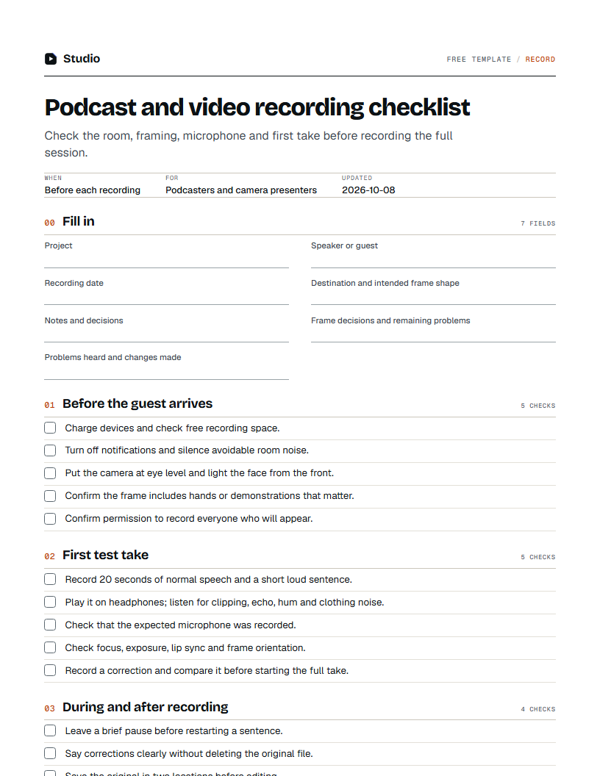 Free printable · Record
Podcast and video recording checklist
Check the room, framing, microphone and first take before recording the full session.
Get the template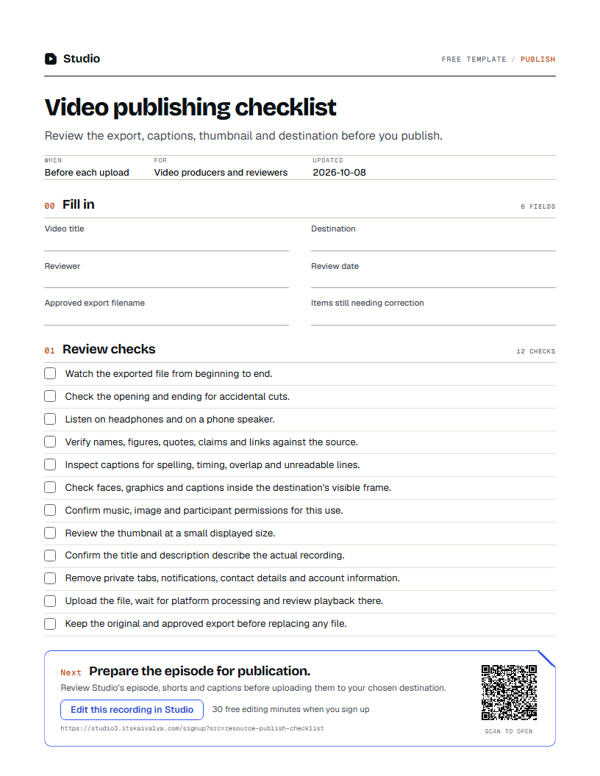 Free printable · Publish
Video publishing checklist
Review the export, captions, thumbnail and destination before you publish.
Get the template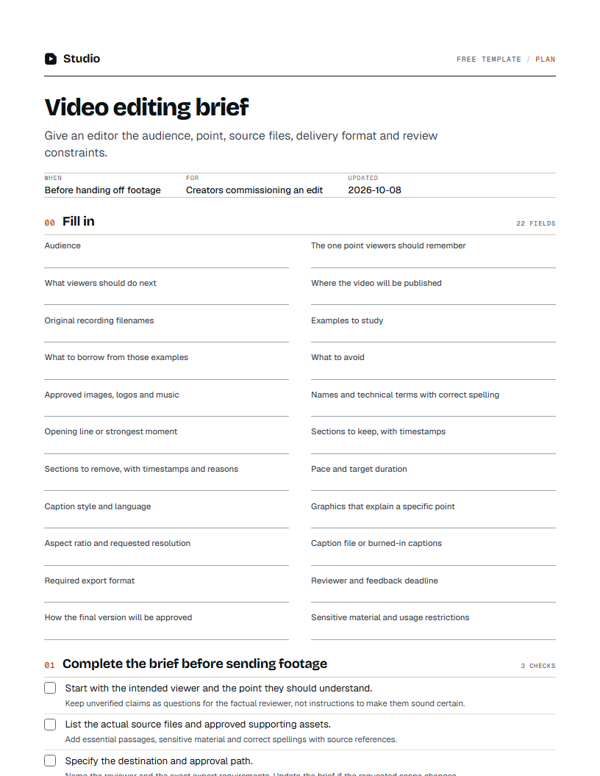 Free printable · Plan
Video editing brief
Give an editor the audience, point, source files, delivery format and review constraints.
Get the templateWant the whole recording edited?
Upload it to Studio. Get back a finished video with captions and clips, then ask for changes in plain words.