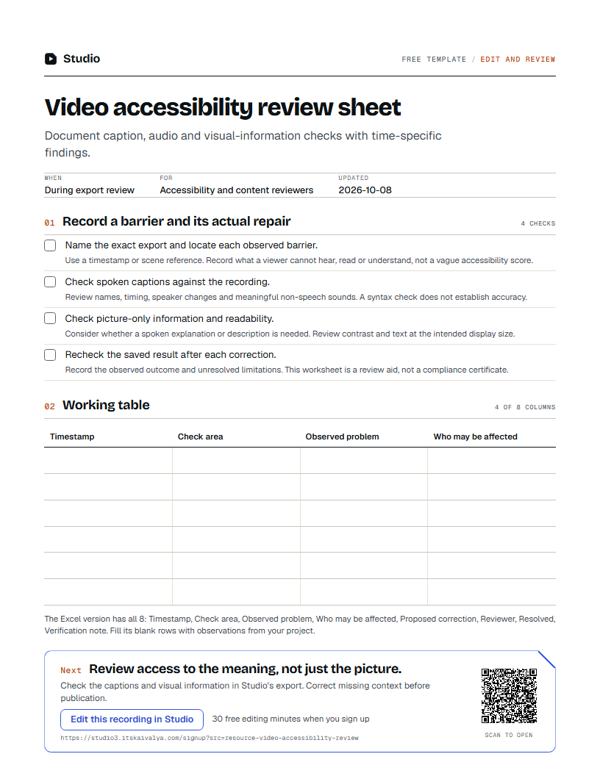
Video accessibility review sheet
Document caption, audio and visual-information checks with time-specific findings.
- WhenDuring export review
- ForAccessibility and content reviewers
- Inside8 columns
PDF, A4, 1 page · No email needed
00:10What's inside
8 columns, ready to fill in.
Fill the blank rows in the Excel version, or print the PDF. Keep observations tied to your own project.
| Timestamp | Check area | Observed problem | Who may be affected | Proposed correction | Reviewer | Resolved | Verification note |
|---|---|---|---|---|---|---|---|
Swipe the table sideways to see every column.
How to use it
- Name the exact export and locate each observed barrier.Use a timestamp or scene reference. Record what a viewer cannot hear, read or understand, not a vague accessibility score.
- Check spoken captions against the recording.Review names, timing, speaker changes and meaningful non-speech sounds. A syntax check does not establish accuracy.
- Check picture-only information and readability.Consider whether a spoken explanation or description is needed. Review contrast and text at the intended display size.
- Recheck the saved result after each correction.Record the observed outcome and unresolved limitations. This worksheet is a review aid, not a compliance certificate.
00:20Next on your list
See all templates
More free templates.
-
8 columns
Edit feedback sheet
Record time-specific changes with their reason and a clear acceptance check. -
12 checks · 5 fields
Caption review checklist
Check words, timing, readability and presentation against the actual recording. -
11 columns
Podcast-to-shorts planner
Choose clips with a complete point, source timestamps and a reason to watch.
00:30Your next step
Start with your recording
Edit this recording in Studio
30 free minutes · No card
Review access to the meaning, not just the picture.
Check the captions and visual information in Studio’s export. Correct missing context before publication.
Free tool for this step: Subtitle readability checker