Edit feedback sheet
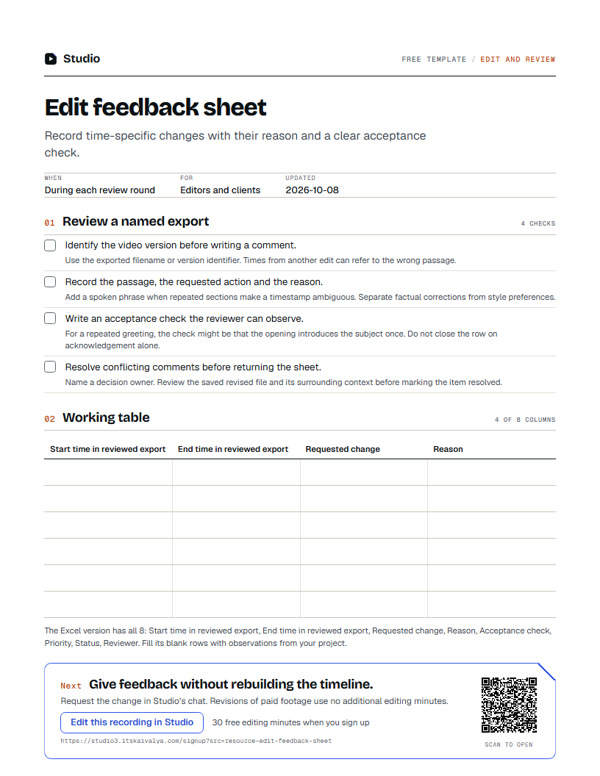
Record time-specific changes with their reason and a clear acceptance check.
- WhenDuring each review round
- ForEditors and clients
- Inside8 columns
PDF, A4, 2 pages · No email needed
00:10What's inside
8 columns, ready to fill in.
Fill the blank rows in the Excel version, or print the PDF. Keep observations tied to your own project.
| Start time in reviewed export | End time in reviewed export | Requested change | Reason | Acceptance check | Priority | Status | Reviewer |
|---|---|---|---|---|---|---|---|
Swipe the table sideways to see every column.
How to use it
- Identify the video version before writing a comment.Use the exported filename or version identifier. Times from another edit can refer to the wrong passage.
- Record the passage, the requested action and the reason.Add a spoken phrase when repeated sections make a timestamp ambiguous. Separate factual corrections from style preferences.
- Write an acceptance check the reviewer can observe.For a repeated greeting, the check might be that the opening introduces the subject once. Do not close the row on acknowledgement alone.
- Resolve conflicting comments before returning the sheet.Name a decision owner. Review the saved revised file and its surrounding context before marking the item resolved.
00:20Next on your list
See all templates
More free templates.
-
12 checks · 5 fields
Caption review checklist
Check words, timing, readability and presentation against the actual recording. -
11 columns
Podcast-to-shorts planner
Choose clips with a complete point, source timestamps and a reason to watch. -
8 columns
Video accessibility review sheet
Document caption, audio and visual-information checks with time-specific findings.
00:30Your next step
Start with your recording
Edit this recording in Studio
30 free minutes · No card
Give feedback without rebuilding the timeline.
Request the change in Studio’s chat. Revisions of paid footage use no additional editing minutes.
Free tool for this step: Video trimmer