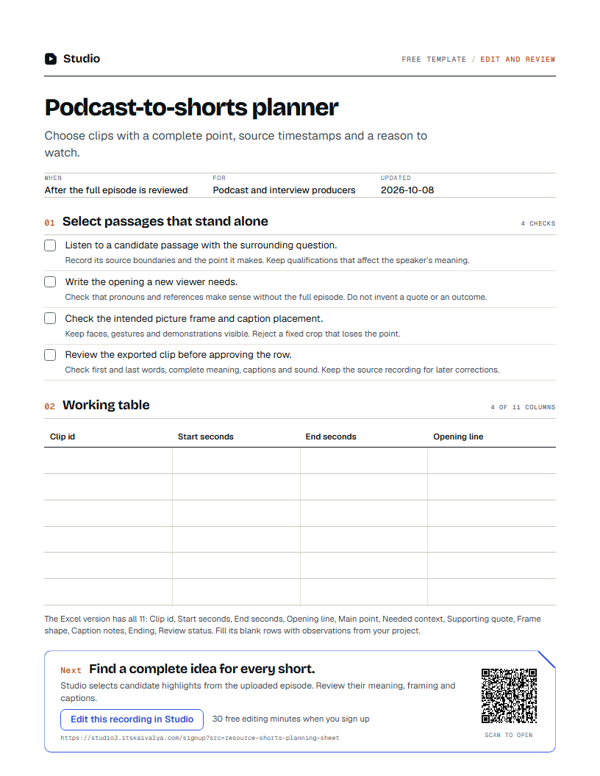
Podcast-to-shorts planner
Choose clips with a complete point, source timestamps and a reason to watch.
- WhenAfter the full episode is reviewed
- ForPodcast and interview producers
- Inside11 columns
PDF, A4, 1 page · No email needed
00:10What's inside
11 columns, ready to fill in.
Fill the blank rows in the Excel version, or print the PDF. Keep observations tied to your own project.
| Clip id | Start seconds | End seconds | Opening line | Main point | Needed context | Supporting quote | Frame shape | Caption notes | Ending | Review status |
|---|---|---|---|---|---|---|---|---|---|---|
Swipe the table sideways to see every column.
How to use it
- Listen to a candidate passage with the surrounding question.Record its source boundaries and the point it makes. Keep qualifications that affect the speaker’s meaning.
- Write the opening a new viewer needs.Check that pronouns and references make sense without the full episode. Do not invent a quote or an outcome.
- Check the intended picture frame and caption placement.Keep faces, gestures and demonstrations visible. Reject a fixed crop that loses the point.
- Review the exported clip before approving the row.Check first and last words, complete meaning, captions and sound. Keep the source recording for later corrections.
00:20Next on your list
See all templates
More free templates.
-
8 columns
Edit feedback sheet
Record time-specific changes with their reason and a clear acceptance check. -
12 checks · 5 fields
Caption review checklist
Check words, timing, readability and presentation against the actual recording. -
8 columns
Video accessibility review sheet
Document caption, audio and visual-information checks with time-specific findings.
00:30Your next step
Start with your recording
Edit this recording in Studio
30 free minutes · No card
Find a complete idea for every short.
Studio selects candidate highlights from the uploaded episode. Review their meaning, framing and captions.
Free tool for this step: Content repurposing planner