Video experiment log
Record one deliberate change at a time and compare outcomes without inventing causation.
- WhenBefore and after a publication test
- ForContent teams testing a specific question
- Inside13 columns
PDF, A4, 2 pages · No email needed
00:10What's inside
13 columns, ready to fill in.
Fill the blank rows in the Excel version, or print the PDF. Keep observations tied to your own project.
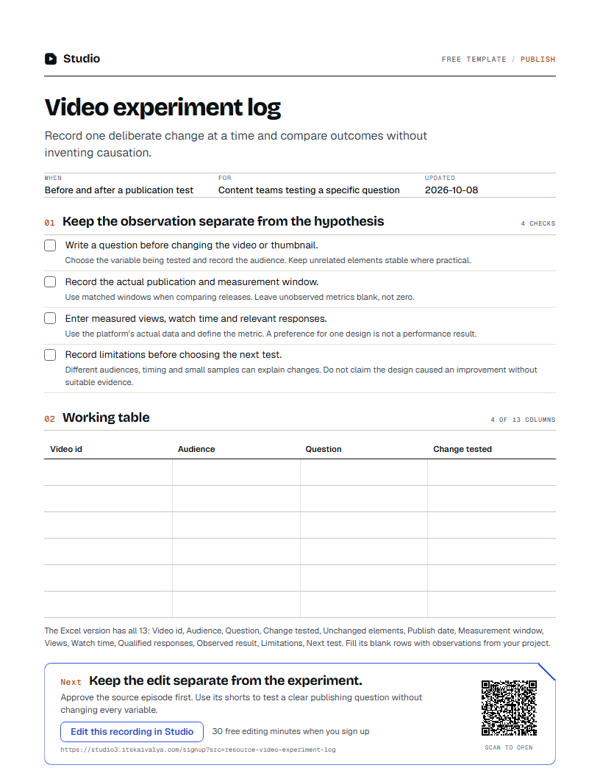
| Video id | Audience | Question | Change tested | Unchanged elements | Publish date | Measurement window | Views | Watch time | Qualified responses | Observed result | Limitations | Next test |
|---|---|---|---|---|---|---|---|---|---|---|---|---|
Swipe the table sideways to see every column.
How to use it
- Write a question before changing the video or thumbnail.Choose the variable being tested and record the audience. Keep unrelated elements stable where practical.
- Record the actual publication and measurement window.Use matched windows when comparing releases. Leave unobserved metrics blank, not zero.
- Enter measured views, watch time and relevant responses.Use the platform’s actual data and define the metric. A preference for one design is not a performance result.
- Record limitations before choosing the next test.Different audiences, timing and small samples can explain changes. Do not claim the design caused an improvement without suitable evidence.
00:20Next on your list
See all templates
More free templates.
-
12 checks · 6 fields
Video publishing checklist
Review the export, captions, thumbnail and destination before you publish. -
10 checks
YouTube description outline
Write a description that explains the actual recording and links only to verified destinations. -
3 checks · 22 fields
Video editing brief
Give an editor the audience, point, source files, delivery format and review constraints.
00:30Your next step
Start with your recording
Edit this recording in Studio
30 free minutes · No card
Keep the edit separate from the experiment.
Approve the source episode first. Use its shorts to test a clear publishing question without changing every variable.
Free tool for this step: Content repurposing planner