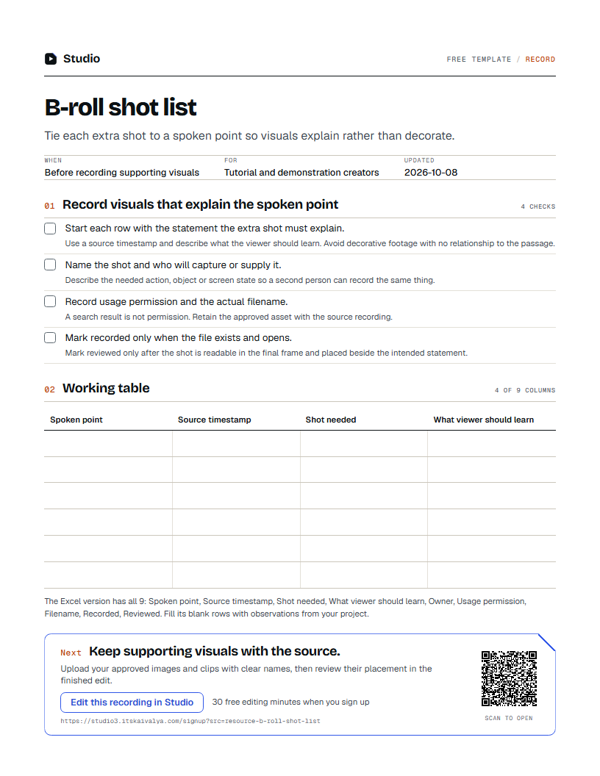
B-roll shot list
Tie each extra shot to a spoken point so visuals explain rather than decorate.
- WhenBefore recording supporting visuals
- ForTutorial and demonstration creators
- Inside9 columns
PDF, A4, 1 page · No email needed
00:10What's inside
9 columns, ready to fill in.
Fill the blank rows in the Excel version, or print the PDF. Keep observations tied to your own project.
| Spoken point | Source timestamp | Shot needed | What viewer should learn | Owner | Usage permission | Filename | Recorded | Reviewed |
|---|---|---|---|---|---|---|---|---|
Swipe the table sideways to see every column.
How to use it
- Start each row with the statement the extra shot must explain.Use a source timestamp and describe what the viewer should learn. Avoid decorative footage with no relationship to the passage.
- Name the shot and who will capture or supply it.Describe the needed action, object or screen state so a second person can record the same thing.
- Record usage permission and the actual filename.A search result is not permission. Retain the approved asset with the source recording.
- Mark recorded only when the file exists and opens.Mark reviewed only after the shot is readable in the final frame and placed beside the intended statement.
00:20Next on your list
See all templates
More free templates.
-
35 checks · 7 fields
Podcast and video recording checklist
Check the room, framing, microphone and first take before recording the full session. -
11 checks · 1 field
Screen recording checklist
Prepare a clean screen capture with readable text and no private information. -
10 checks · 2 fields
Raw footage handoff checklist
Send the source files and editing decisions together so the next person can continue.
00:30Your next step
Start with your recording
Edit this recording in Studio
30 free minutes · No card
Keep supporting visuals with the source.
Upload your approved images and clips with clear names, then review their placement in the finished edit.
Free tool for this step: Video joiner